Picture a page covered in small circles. At first, they form a perfectly regular grid. Then each row begins to bend. Some circles grow, others fade, and a pattern resembling moving water emerges. Nobody has repositioned the circles individually. A short program has changed the relationships between them.
This is one way to make art with mathematics and code: describe a process, run it, inspect what happens and refine the process. The picture is both a visual composition and the result of a system. Understanding the system gives us a different kind of creative control.
Rules become drawing tools
An algorithm is a sequence of instructions. In an artwork, those instructions might place a mark, repeat it, change its size and stop when a boundary is reached. Procedural art builds visual material through such processes. A generative artwork gives a system some role in producing the result; that system need not involve machine learning.
For our circles, the rules might specify eight rows, equal spacing and a limited colour palette. The spacing, circle size and number of rows are parameters: values we can adjust without rewriting the whole process.
This makes code useful as a sketching medium. Processing's creators describe its origins as a software sketchbook for exploring programming in a visual context, and its applications extend to printed images, installations and motion graphics. 1
The artist still makes decisions. A program can produce thousands of arrangements without knowing which one feels calm, crowded or unresolved. Selecting, editing and deciding when to stop remain part of the work.
Coordinates give every mark an address
A two-dimensional drawing assigns each point an x position and a y position. In a typical p5.js 2D canvas, the origin sits at the top-left corner, x increases towards the right and y increases downwards. Other drawing systems use different conventions, so the coordinate system is worth checking. 2
Transformations let us work with groups of marks. Translation moves them, rotation turns them and scaling changes their size. Rather than calculate every point of a flower again, we can draw one petal and rotate copies around a shared centre.
Order matters. Rotating a coordinate system and then moving along its x-axis sends the movement in the rotated direction. Moving first and then rotating can produce a different result. 2
This is a practical reason to think in local coordinates. Draw a motif around its own centre, then position it in the larger composition. The motif becomes a reusable building block instead of a collection of unrelated pixel locations.
Trigonometry supplies rhythm
Sine and cosine are useful far beyond school triangles. As an angle changes, sine oscillates smoothly between −1 and 1. Multiply that result by an amplitude and add a centre position, and a mark moves back and forth around that centre. 3
For example, y = centreY + 20 × sin(angle) places the mark up to 20 units above or below its centre. Increasing the angle over time makes the mark oscillate. Using horizontal position in place of time produces a wave across the page.
Sine and cosine together can describe points around a circle. Related functions can also drive colour, opacity or size. A wave is therefore a reusable source of changing values, not merely a curve to draw. 10
For our grid, give each column a slightly different angle. Give each row an additional offset, called a phase shift. The circles now form related waves instead of moving in unison.
Randomness and noise create different kinds of variation
Independent random choices can scatter circles across a canvas or choose colours unpredictably. Give every circle a separate vertical offset and the grid becomes jittery: neighbouring marks have no requirement to move together.
Coherent procedural noise offers another behaviour. In p5.js, nearby inputs to noise() produce similar outputs. Sampling this field along a line or across a grid creates connected variation, useful for undulating shapes, textures and motion. Changing the spacing between input coordinates changes how rapidly the output varies. 4
Neither behaviour is automatically better. Independent offsets can suggest vibration or visual grain. Coherent variation can suggest a current passing through the entire grid. The choice is about the relationship we want neighbouring marks to have.
Noise also does not reproduce nature by itself. A smoothly changing function can suggest water without simulating water's forces. Visual resemblance and physical modelling are different goals.
A seed makes an experiment repeatable
Many creative coding tools use pseudorandom generators: algorithms that produce sequences with random-looking properties. A seed establishes the generator's starting state. Keeping that seed fixed lets us revisit the same sequence while adjusting other aspects of the picture. p5.js exposes this through randomSeed(). 5
That is useful when comparing two palettes. If the layout changes at the same time, it becomes difficult to tell whether the new colours improved the composition. Preserve the layout and the comparison becomes clearer.
A seed is not a complete recipe. Reproduction also depends on the generator, code, parameters and order of random calls. Adding one extra random choice can shift the later sequence. Record those ingredients alongside the seed.
Noise may have its own generator and seed setting. In p5.js, noiseSeed() controls noise independently of randomSeed(). Setting one does not substitute for setting the other. 6
Fractals repeat structure at smaller scales
The Koch curve begins with a line. Divide it into three equal parts and replace the middle third with the other two sides of an outward-pointing equilateral triangle. One segment becomes four, each one-third as long. Apply the same replacement to every segment. 7
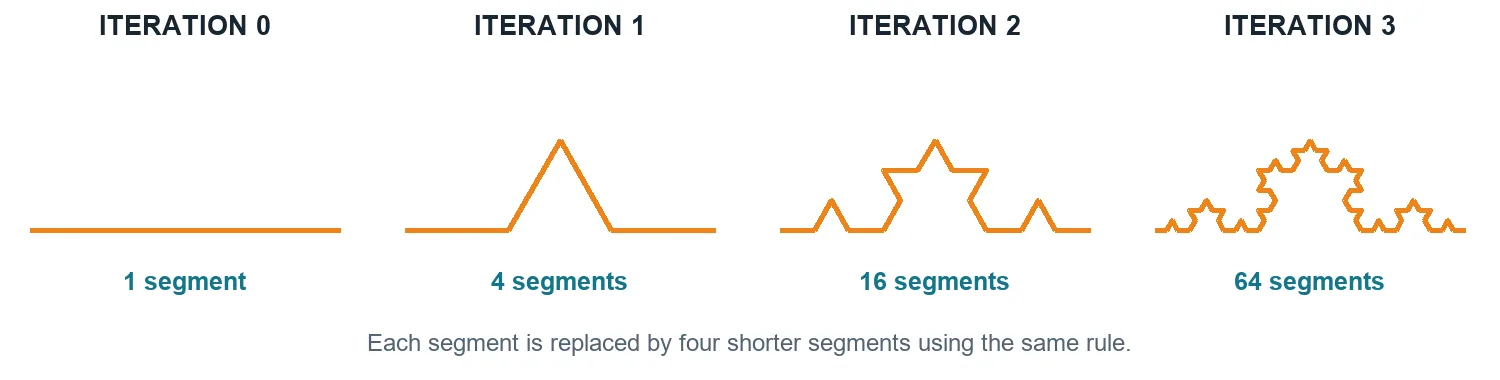
After n iterations, the curve has 4ⁿ segments, each with length L/3ⁿ if the original segment had length L. Its total length is therefore L × (4/3)ⁿ. The growing detail comes from repeated application of one rule.
The mathematical fractal involves an infinite limiting process. A drawing uses finitely many iterations and finite display resolution. More iterations eventually add detail too small to distinguish while increasing computation. 7
That gives the artist two decisions: choose the rule and choose the scale at which to stop. The third iteration may suit a clean graphic better than a much denser version.
L-systems turn a grammar into growth
An L-system starts with a string of symbols and rules for replacing them. Each generation rewrites the symbols in parallel. A drawing interpretation can then turn the resulting string into movements: F means draw forward, while + and − mean turn by a chosen angle. 8
For a simple branching experiment, a rule could replace F with F[+F]F[−F]. Brackets save and restore the drawing position and direction, allowing the process to return to a junction after drawing a branch. Changing the turn angle or segment length changes the resulting structure.
L-systems were developed in the study of plant development, and their graphical interpretations can create branching forms. 8 A convincing botanical model needs more than a decorative branching rule, however. Our small example is a visual grammar: a compact description of how a pattern develops.
The same idea can leave the botanical world entirely. Interpret symbols as tiles, strokes or musical events, and the grammar becomes a way to organise other kinds of composition.
Shaders can calculate the surface itself
Drawing circles is one approach. Another is to calculate colour across a surface. A fragment shader is a program in the graphics pipeline that can produce colour values for fragments generated while drawing geometry. Those fragments contribute to the final image; they are not simply interchangeable with finished pixels. 9
A procedural texture can define colour from coordinates. A repeating sine function can produce stripes. A distance calculation can produce rings. Distort the coordinates before evaluating the pattern and straight bands begin to curl. These are examples of constructing appearance through functions rather than painting every mark. 10
Time can become another input, allowing the pattern to move. The texture might fill the screen or become part of a material on a 3D object. The underlying creative question remains familiar: which relationships between values produce the visual behaviour we want?
Try a small experiment
Create a 600 × 400 canvas in a drawing tool that supports code. Place 60 columns of dots across eight rows. Number columns i from 0 to 59 and rows j from 0 to 7. Set x = 30 + 9i and y = 50 + 40j, using a dot diameter of four pixels. This produces 480 dots with comfortable margins.
Keep x unchanged and replace y with 50 + 40j + 12 × sin(0.22i + 0.45j). Use radians. The 12 controls the wave's height, 0.22 controls how quickly it changes across columns, and 0.45 shifts neighbouring rows relative to each other. Change only one value at a time. 3
Next, replace the sine term with 24 × (noise(0.08i, 0.15j) − 0.5). In p5.js, noise returns values between zero and one, so this scales and centres the displacement within a range of −12 to 12. Fix a noise seed before comparing variations. 46
Save the regular grid, wave and noise versions together. Give each the same colours and dot sizes. Look for the point where an orderly pattern starts to feel alive without losing its structure. Only then experiment with the palette. This keeps the visual comparison understandable.
How this relates to AI-generated art
All these methods use computation, but they give the artist different controls. In the dot experiment, we specify the relationship between position and displacement directly. In a learned image generator, much of the image-producing behaviour comes from parameters fitted to training data. The original denoising diffusion research, for example, describes training models to reverse a gradual noising process. 11
This is not a division between mathematics and AI, or between repeatability and randomness. Both can involve mathematics, algorithms and seeded variation. The useful distinction is what the artist can specify and revise in the particular workflow.
A possible hybrid workflow is to generate a precise pattern with code, explore treatments with an image model, and retain the original pattern as an editable source. Another is to use an AI assistant to help write a sketch, then inspect and adjust its rules. These are workflow options, not guarantees about any model's output.
The reward of learning a little creative mathematics is direct: a parameter becomes a handle on the image. We can change the rhythm, spacing or branching logic deliberately, then let the result surprise us.
Sources and further reading
Specifications, research papers and official documentation support the technical explanations. The examples and diagrams are original editorial material. Research checked on 23 October 2026.
- Processing — Overview — Overview — The creators explain code as a visual sketching medium and describe creative applications.
- p5.js — Coordinates and Transformations — Coordinates and Transformations — Explains coordinate conventions, translation, rotation, scaling and why transformation order matters.
- p5.js — sin() — sin() — Documents sine, its output range and angle units used in the dot experiment.
- p5.js — noise() — noise() — Documents coherent noise, coordinate inputs, output range and spatial variation.
- p5.js — randomSeed() — randomSeed() — Documents repeatable pseudorandom sequences when the seed is fixed.
- p5.js — noiseSeed() — noiseSeed() — Documents the separate seed used to reproduce a noise field.
- Daniel Shiffman — The Nature of Code, Fractals — The Nature of Code, Fractals — The author's educational treatment explains Koch construction, growth and finite computational approximations.
- Prusinkiewicz and Lindenmayer — The Algorithmic Beauty of Plants, Chapter 1 — The Algorithmic Beauty of Plants, Chapter 1 — Primary text explaining parallel rewriting, turtle interpretation and branching L-systems.
- Khronos — The OpenGL Shading Language — The OpenGL Shading Language — Official specification for fragment processing and shader outputs.
- Gonzalez Vivo and Lowe — The Book of Shaders, Shaping Functions — The Book of Shaders, Shaping Functions — The authors demonstrate using coordinates and mathematical functions to construct visual patterns.
- Ho, Jain and Abbeel — Denoising Diffusion Probabilistic Models — Denoising Diffusion Probabilistic Models — Original research illustrating image generation through a learned denoising process.